Step 1
Design themes in seconds
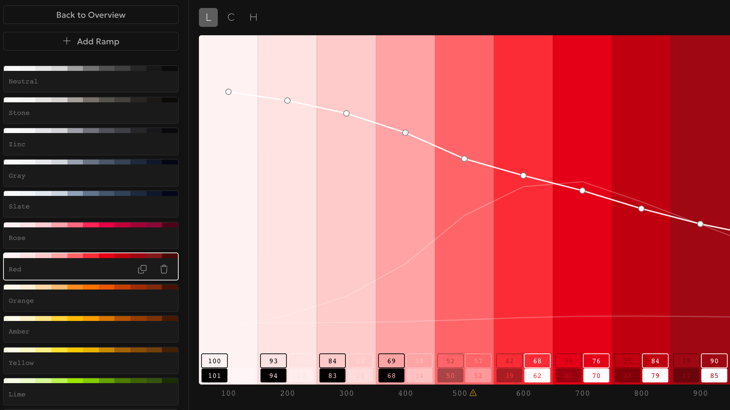
Pick your base colors and generate a balanced theme ramp in seconds, OKLCH by default. Start with a strong foundation instead of nudging swatches one by one.

Color palette tooling
for designers and developers
You can build a full palette as a guest, no account needed. A free account adds the ones marked Account, like cloud save and Figma sync.
Build each palette in OKLCH, OKHSL, HSL, or RGB and edit its own channels. OKLCH is the default for even, accessible ramps.
Learn more about Color Space ChoiceShape lightness, chroma, and hue curves in OKLCH, the perceptually uniform default.
Learn more about OKLCH Curve EditingDrag one curve point and let its neighbors follow with a smooth, sharp, or linear falloff you can fine-tune.
Learn more about Soft SelectGroup ramps within a palette for a clean editing workflow.
Export themes as CSS variables, design tokens, Tailwind (v4 theme or v3 config), and JSON.
Learn more about Export ReadyCheck APCA contrast while building themes to catch readability issues early.
Learn more about APCA ContrastSet a master ramp per group to propagate curve edits to the other ramps in that group, and sync APCA contrast targets in one click.
Generate the missing Light or Dark group as a mirrored copy that stays linked, so edits in one group flow into the other until you unlink them.
Learn more about Linked Dark Mode GroupsOrganize saved palettes into projects and move them between projects as your work grows.
Learn more about ProjectsSave themes to your account and continue on any device.
Share a palette with friends and colleagues via a read-only link. No account needed to view it.
Learn more about Share by LinkSync palettes into Figma as Variables directly from the Rampancy Figma plugin.
Learn more about Figma PluginStep 1
Pick your base colors and generate a balanced theme ramp in seconds, OKLCH by default. Start with a strong foundation instead of nudging swatches one by one.
Step 2
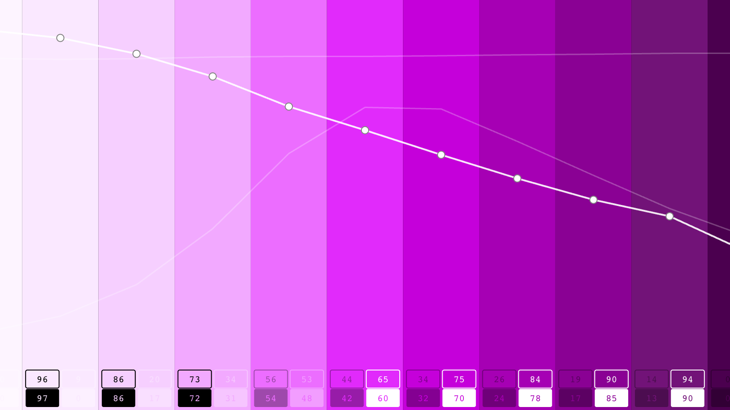
Fine-tune lightness, chroma, and hue curves while APCA contrast updates in real time. Set a master ramp per group to propagate edits across it, or generate a linked Dark counterpart of your Light group and shape both themes at once.
Step 3
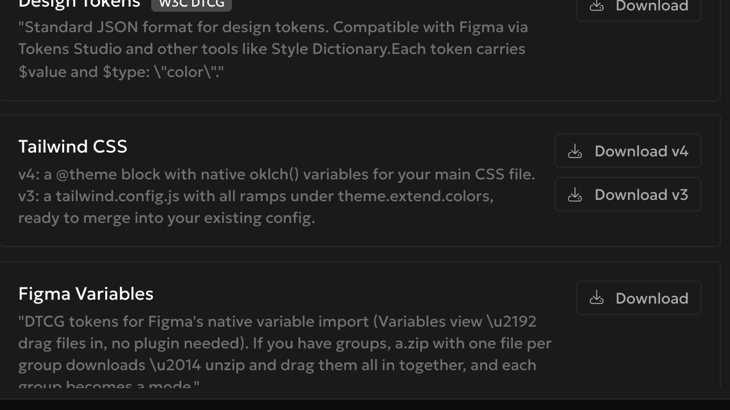
Export production-ready themes to CSS, tokens, Tailwind, or JSON, or sync palettes to Figma as Variables. Move from exploration to implementation, or share a read-only palette link without rebuilding anything by hand.
Create accessible color scales faster than tweaking single swatches.
Ship production-ready themes without rebuilding color tokens by hand.
Standardize reusable theme ramps with APCA-focused contrast guidance.
No. You can start as a guest right away and build complete palette ramps without signing in. Registering adds cloud save and sync so your themes follow you across devices, plus integrations like the Figma plugin.
Rampancy exports CSS custom properties with your palette's native color function (oklch(), hsl(), or rgb()) for app styling, design tokens for system-driven theming, Tailwind themes for utility-first projects (a v4 @theme stylesheet or a v3 configuration object), and JSON for custom pipelines. The goal is to move from palette exploration to implementation without manually rewriting values.
Read the full guide: Export Anywhere: CSS, Tailwind, Design Tokens & Figma
OKLCH is perceptually uniform: equal lightness values look equally bright across every hue, so a ramp built in OKLCH stays balanced from one color family to the next, which keeps contrast predictable. That's why it's the default. You can still pick OKHSL, HSL, or RGB per palette when you want familiar knobs or exact channel values.
Read the full guide: Why Rampancy Ramps Stay Consistent Across Every Hue
Yes. When you create a palette you pick its color space: OKLCH, OKHSL, HSL, or RGB. Each edits its own channels and exports its native CSS. OKLCH stays the default for even, accessible ramps, but the choice is yours per palette.
Read the full guide: Build color ramps in OKLCH, OKHSL, HSL, or RGB
APCA stands for Accessible Perceptual Contrast Algorithm. It measures contrast using perceptual readability instead of older pass-fail thresholds, which gives more practical guidance while you shape text and surface pairs. In Rampancy, APCA feedback helps you catch weak combinations early, then validate final themes in real UI contexts.
Read the full guide: Accessible by Default: APCA Contrast & Sync APCA Values
Yes. The Rampancy Figma plugin is available now on the Figma Community and syncs your palettes into Figma as Variables, so implementation and mockups stay aligned. Pair it with a personal access token from Account Settings, then sync any saved palette with one click.
Read the full guide: Sync Palettes to Figma with the Rampancy Plugin
Yes. From the palette editor, registered users can generate a share link that opens a read-only view of the palette, no account needed on the viewer's end. The link can be revoked at any time, and the palette overview shows which palettes are currently shared.
Yes. Name a group Light or Dark, and the Generate button creates the missing group as a mirrored copy with the same values in reversed step order. For registered users, the two groups stay linked until you unlink them, and each group checks APCA contrast against its own foreground and background pair.
Read the full guide: Generate a Linked Dark Mode Palette from Your Light Theme
Support the project
No paywalls. No subscriptions. Just pixels, palettes, and occasional espresso.
Buy Me a Coffee