
Export Anywhere: CSS, Tailwind, Design Tokens & Figma
- export
- tailwind
- design-tokens
- figma
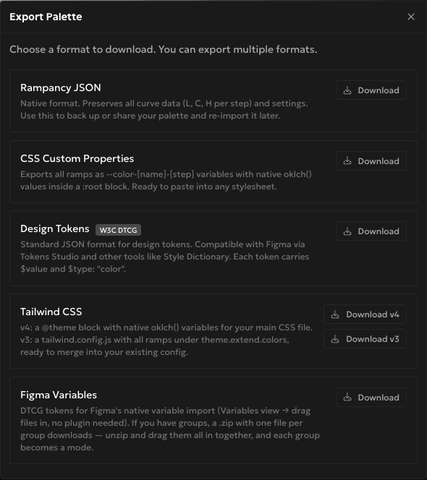
Every ramp you build in Rampancy can leave the app as five different file formats, and you can grab all of them without touching the clipboard once. One modal, six download buttons, done.
What You'll Need
- A Rampancy palette with at least one ramp (the built-in Tailwind preset works fine if you just want to try this).
- Nothing else. Every export runs client-side, no plugin, no CLI.
Step 1: Open the Export modal
In the editor, the left sidebar has an Export button sitting right next to Import. Click it and a modal opens with every format laid out as its own card: a short description, then a Download button. You can grab more than one format in the same session, nothing here is single-use.
Step 2: Keep a native backup
The first card, Rampancy JSON, is the one to reach for before you do anything risky to a palette. It's the only format that keeps every curve point per step, plus your master-ramp and easing settings. Download it, and you can re-import that exact file later and pick up editing where you left off. Every other format below is a one-way trip out of Rampancy; this one is round-trip.

Step 3: Export CSS variables
CSS Custom Properties gives you a :root block with one --color-<name>-<step> variable per swatch, values written in your palette's native color function (oklch(), hsl(), or rgb()). Ramp names get lowercased and slugified for you, so "Brand Blue" becomes --color-brand-blue-500, no manual find-and-replace required. Paste the block into any stylesheet and you're done.

Step 4: Pick your Tailwind version
This is where I've tripped myself up before: Rampancy gives you two separate Tailwind downloads, and they're not interchangeable. Download v4 gets you a @theme block in your palette's native color function (oklch(), hsl(), or rgb()), meant for Tailwind 4's CSS-first config. Download v3 gets you a full tailwind.config.js with your ramps under theme.extend.colors, in hex, for projects still on the old JS config format. Grab the one that matches your actual project, not the one that sounds newer.

Step 5: Send colors straight into Figma
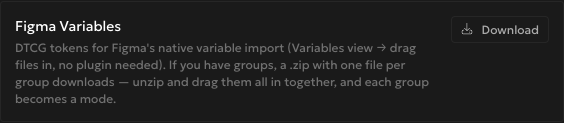
Figma Variables exports W3C DTCG tokens that Figma's own Variables panel can import directly, drag the file in and you're set, no plugin required. If your palette has groups, this one changes shape: instead of a single file you get a zip with one file per group, and each group becomes its own mode once you drag them all in together. Handy if you're keeping a light and dark set of the same ramps as two modes of one variable collection.
FAQ
Which formats keep CSS color functions and which use hex?
CSS Custom Properties and Tailwind v4 write your palette's native color function (oklch(), hsl(), or rgb()), matching the space you built in. Rampancy JSON keeps the raw curve points so it can round-trip. Design Tokens, Tailwind v3, and Figma Variables convert to hex, since that's what those tools and file formats expect.
Do I need the Figma plugin for this?
No. Figma Variables is a plain file import through Figma's own Variables panel. The separate Rampancy Figma plugin does other things and isn't required for getting your colors into a Figma file.
How are the export keys named?
Ramp and group names get run through the same lowercase-and-slugify pass everywhere: spaces become hyphens, capitals go lowercase. Steps are labeled 100 through however many steps your ramp has, lightest to darkest.
Grab a palette and try exporting it in two formats back to back, it takes about ten seconds longer than exporting one. Or just sign up and build one from scratch.